On June 16, 2026, Microsoft announced that Copilot Cowork is now generally available worldwide. It’s a notable step beyond the Copilot chat experience most teams already know, and because it’s billed based on usage, it deserves a closer look before you switch it on. Here are the questions we’re hearing most from clients, answered in plain terms.
The Basics of Copilot Cowork
What is Copilot Cowork?
Copilot Cowork is an AI capability developed in collaboration with Anthropic inside Microsoft 365 that takes on complex, long-running tasks from start to finish. Instead of giving you a draft or a suggestion to refine, you define the work, and Cowork runs it end-to-end and hands back a completed result. Because it runs in the cloud, tasks keep running even when your laptop is closed, and your files are also stored there.
How is Copilot Cowork different from the Copilot I already use?
Copilot Basic and Premium are great for in-the-moment help: drafting an email, summarizing a meeting, building a formula. Cowork is built for bigger, multi-step jobs that pull from several sources and use multiple tools along the way, the kind of work that might otherwise take a person hours or days. Think of Copilot as an assistant beside you, and Cowork as a worker you delegate an entire task to.
What can Copilot Cowork actually do?
During the preview, early users reported putting Cowork to work on tasks like comparing thousands of files across two product versions, keeping spreadsheets and dependency charts in sync as data changed, and reviewing a stalled sales pipeline to surface at-risk deals along with the follow-up each one needed. The common thread is real, end-to-end output rather than just answers. Results will vary with your data and how a task is set up, so the practical question for any business is which of your own recurring tasks are a good fit.
Why Businesses Use Copilot Cowork
Why are companies adopting Copilot Cowork?
The appeal is reclaiming time on work that’s important but tedious. Tasks that involve gathering information from many places, reasoning through it, and producing several outputs are exactly where Cowork shines. For a small or mid-sized team with busy teams, automating that kind of work can free people to focus on higher-value priorities.
Frontier vs. general availability: what changed, especially on cost?
Many businesses first saw Cowork through Microsoft’s Frontier preview program. The biggest practical difference at general availability is billing. During the preview, Cowork usage was part of the Frontier experience; now that it’s generally available, usage-based billing is live and every task draws down Copilot Credits. If your tenant had at least one Frontier user who used Cowork between March 30 and June 16, 2026, Microsoft is applying a grace period and will not bill that tenant for Cowork usage until July 1, 2026, to ease the transition. Billing is not automatically charged but rather needs to be manually set up within your tenant.
A second difference is model choice, which is also a cost lever. At general availability, Cowork runs on Anthropic models (Opus 4.8 and Sonnet 4.6). In Frontier, additional options such as GPT 5.5 and a model picker were available, letting users match a cheaper or more powerful model to each task.
A new lower-cost model, Cowork 1, is expected soon.
The takeaway: if your team tried Cowork during the preview, the experience is similar, but the meter is now running, so cost controls matter more than ever.
Is Copilot Cowork secure enough for our business?
Cowork operates inside your existing Microsoft 365 trust boundary. Prompts, responses, and anything it generates flow through the same Microsoft 365 controls you already rely on, including audit logs, eDiscovery, data lifecycle and retention, and sensitivity labels that carry through end to end. Importantly, Cowork is turned off by default; your administrators decide if and when to enable it along with who gets access.
What risks should we plan for with Cowork?
Two areas deserve attention before you lean on Cowork.
The first is data protection. Because Cowork can reach across the systems and files it has access to, it’s important that your existing data protection policies, access permissions, and sensitivity labels are in good shape, so the tool only touches what it should and your governance rules continue to apply to anything it produces.
The second is output verification. Cowork is designed to complete a task end-to-end, which means it removes some of the human checkpoints that would normally catch a problem along the way. That convenience cuts both ways: with fewer hands on the work, a mistake can travel further before anyone notices.
Like any AI system, Copilot Cowork can get things wrong, so its output needs a careful review before you rely on it or send it onward. The more a task matters, the more thorough that review should be. A good practice is to treat Cowork’s results as a strong first pass that a knowledgeable person checks, not as a finished product to accept on faith.
Cost Considerations
How much does Copilot Cowork cost?
There are two parts. First, Copilot Cowork requires a Microsoft 365 Premium Copilot license (the standard per-user, per-month subscription). On top of that, Cowork itself is billed based on usage, so you pay only for the tasks people actually run. Usage is measured in “Copilot Credits,” priced at $0.01 per credit on the pay-as-you-go plan.
What makes one AI task cost more than another?
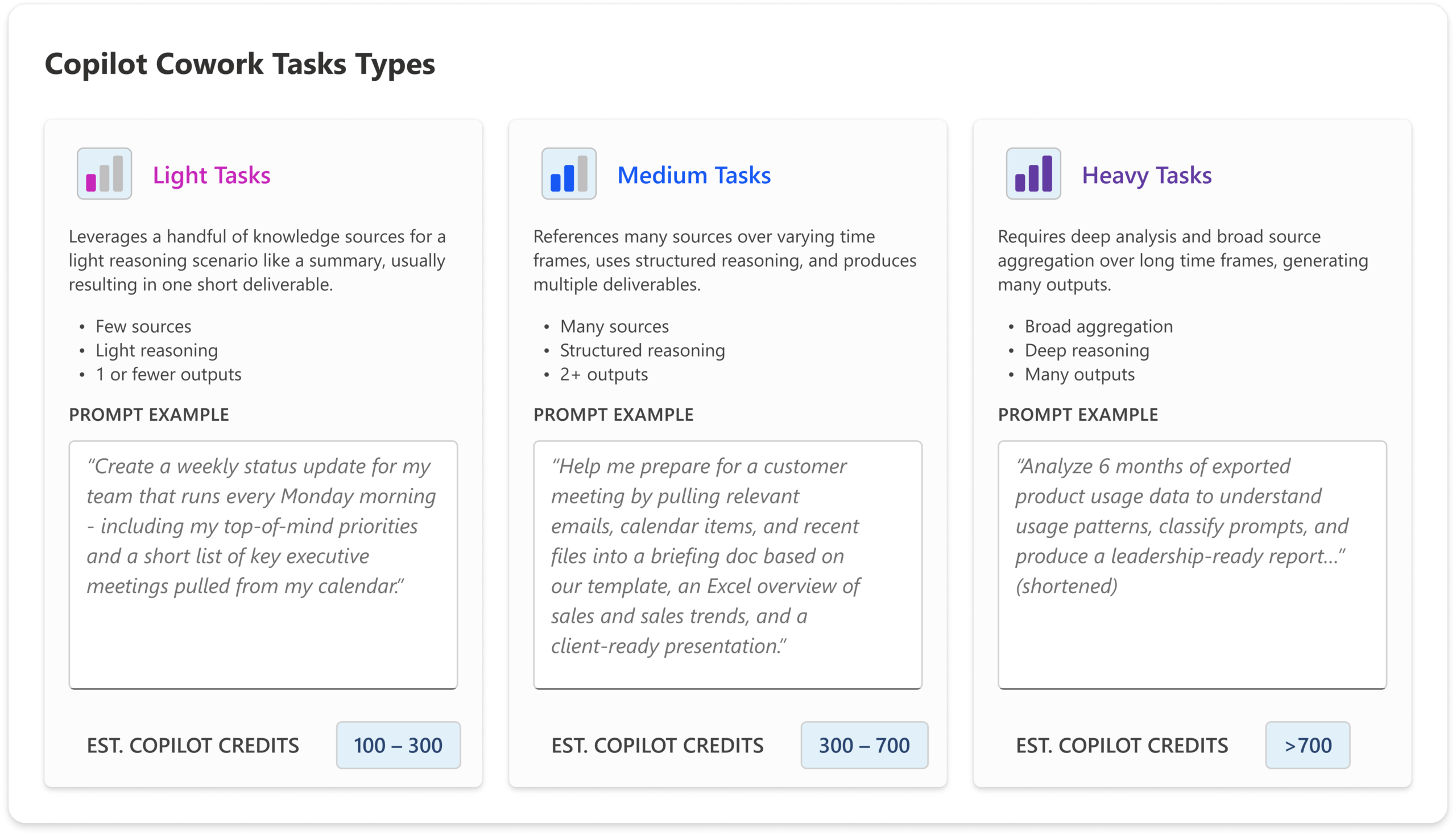
The price of each task is calculated from four things: the AI model used, how much organizational context it has to retrieve, how many tools it calls, and how long it runs. Microsoft groups real-world tasks into three buckets:
- Light: a few sources, limited reasoning, one or no outputs.
- Medium: multiple sources, structured reasoning, two or more outputs.
- Heavy: broad aggregation, deep reasoning, many outputs.
A handful of heavy tasks can cost meaningfully more than a stack of light ones, which is why understanding your team’s likely mix matters. See below:
How do I avoid surprise bills for usage-based AI pricing?
Microsoft has built cost controls directly into the general release. Administrators can:
- Set spending limits at the tenant, group, and individual-user level.
- Create usage alerts at thresholds you choose, with notifications to the right people.
- View usage reporting broken down by user, group, and feature for clear accountability.
- Choose between pay-as-you-go for flexibility, or a pre-purchase commitment (P3) that trades an upfront volume commitment for a discount.
Microsoft also offers a downloadable estimator, and a community-built Copilot Cowork cost calculator lets you model users, prompt mix, and credits per prompt to compare pay-as-you-go against the pre-purchase plan.
Will the cost for Copilot Cowork come down over time?
Microsoft expects so. It cites three trends: models getting cheaper, Cowork getting better at matching the right model to each task, and context retrieval and tool use becoming more efficient. A new, lower-cost model (“Cowork 1”) is also on the way for everyday tasks.
Getting Started: What to Decide Before Rollout
What work should we delegate to Copilot Cowork first?
Start with work that is repetitive, multi-step, and easy to measure, but still has a clear human owner. Good early candidates often involve gathering information across systems, creating recurring reports, preparing client or sales follow-up, or keeping documentation current. Do not start with work that makes high-stakes decisions, has unclear inputs, or cannot be reviewed before it goes out. Governance is key to running successful AI pilots and programs.
Who should own Copilot Cowork in our organization?
Cowork should not be owned by IT alone. IT should manage access, security, and cost controls, but the business leader who owns the workflow should be accountable for the outcome. The strongest deployments pair a technical owner with a business owner who can define what “good” looks like and decide where human approval is still required.
How will we know whether Copilot Cowork is actually worth the cost?
Measure more than credits. Before rollout, establish a baseline for the time, quality, turnaround speed, or capacity involved in the workflow today. Then track whether Cowork produces a visible improvement. The goal is not simply to run more AI tasks. It is to return meaningful time and improve how the work gets done.
Plan Strategically With GadellNet
Usage-based AI can deliver real value, but it rewards a thoughtful rollout. Our team can help you turn Copilot Cowork on the right way.
We can help you:
- Set up the proper billing structure for your organization.
- Put cost controls in place (spending limits, alerts, and access policies) before usage ramps up.
- Develop a plan to forecast costs based on how your team is likely to use it.
- Set up governance, training and enablement programs to support your team in their AI journey
If you’d like to explore whether Copilot Cowork is a fit, talk with your GadellNet consultant or contact us.
Source: Microsoft 365 Blog, “Copilot Cowork is now generally available” (June 16, 2026).
