Small and medium-sized businesses face a common challenge: they have data, but they’re not using it to drive decisions. Implementing business intelligence reporting is no longer optional—it’s a requirement for staying competitive.
This guide covers the core benefits of BI reporting and consulting, from informed decision-making to operational efficiency and risk management. We aim to show you how to build a competitive advantage through effective data strategies.
What Is Business Intelligence Reporting?
Business intelligence reporting is a systematic process of collecting, analyzing, and presenting business data to support informed decision-making. It involves technologies, tools, and methodologies that transform raw data into actionable insights for executives and stakeholders.
The journey starts with data collection and ends with visually compelling reports that inform decisions. In between, organizations move from simply gathering data to actually using it—unlocking opportunities for growth and innovation. This includes spotting marketing trends, understanding customer behavior, and identifying operational inefficiencies.
Think of business intelligence as a vehicle for innovation. It gives SMBs the agility to stay competitive.
Data Collection: Business intelligence reporting relies on a solid foundation of quality data. It is crucial to gather information from various sources, including databases, spreadsheets, CRM systems, and social media. This collection process should be well-structured.
Data Processing: Once data is collected, it undergoes processing to clean, transform, and prepare it for analysis. This phase is crucial to ensure the accuracy and reliability of the data, laying the groundwork for meaningful insights.
Data Analysis: In this phase of business intelligence reporting, advanced analytic tools examine the data for trends, patterns, and anomalies. This is when actionable insights are uncovered to guide decision-makers.
Data Visualization: To make complex data more accessible, business intelligence reporting relies heavily on data visualization techniques. Charts, graphs, dashboards, and other visual representations enhance understanding and facilitate effective communication of insights.
Reporting: The final stage involves creating detailed reports and summaries based on the analyzed data. Reports are tailored to the needs of different stakeholders, providing them with relevant information for strategic decision-making.
What Are the Benefits of Business Intelligence Reporting?
Informed Decision-Making: One of the primary benefits of BI reporting is its ability to empower organizations with the information needed for informed decision-making. By presenting data in a clear and understandable format, decision-makers can navigate through complexities and uncertainties with confidence. Leaders are able to execute on everything from end-of-year planning to product launches with more confidence.
Competitive Advantage: In today’s fast-paced business environment, gaining a competitive edge is essential. Business intelligence has been part of keeping organizations ahead for many years, and now is part of what an organization needs to keep up with competitors, not just get ahead. Business intelligence reporting allows organizations to monitor market trends, analyze competitors, and adapt strategies promptly. Those who harness data effectively often find themselves ahead of the competition.
Improved Operational Efficiency: BI reporting plays a pivotal role in streamlining business processes. By identifying inefficiencies, bottlenecks, and areas for improvement, organizations can optimize their operations, reduce costs, and enhance overall efficiency.
Customer Insights: Understanding customer behavior is critical for success. Business intelligence reporting enables organizations to analyze customer interactions, preferences, and purchase patterns. This insight is invaluable for tailoring products, services, and marketing strategies to meet customer expectations. Knowing your customer better can also lead to more personalized interactions.
Risk Management: BI reporting helps organizations identify and mitigate risks. By analyzing data, businesses can detect potential issues early, whether in supply chain management, financial performance, or compliance. This proactive approach to risk management is instrumental in preventing problems from escalating.
Challenges in Implementing Business Intelligence Reporting: While the benefits of BI reporting are significant, the implementation comes with its set of challenges that organizations must navigate. Many of these challenges are tied to data management. Maintaining data security and compliance with regulations while maintaining quality is difficult.
Data Quality and Integration: The accuracy and reliability of data are paramount for effective reporting. Without good data, the insights gleaned from BI reporting are not trustworthy. Organizations often struggle with data management and ensuring data quality, especially when dealing with data from disparate sources. Integrating data from various systems can be complex and time-consuming. These challenges must be addressed before launching effective business intelligence solutions.
Data Security and Privacy: As organizations deal with sensitive business information, ensuring data security and privacy is a major concern. Business intelligence reporting systems must adhere to strict security measures to safeguard against data breaches and unauthorized access. As your organization vets reporting systems, security should be a top feature evaluated.
Scalability: As data volumes grow, organizations need scalable data management systems that can handle increased demands. Ensuring that the reporting infrastructure can adapt to evolving business needs is a significant challenge. The amount of data your organization has will only grow as you mature in your use of BI reporting.
User Adoption: The success of business intelligence reporting depends on user adoption. Training and educating users, including non-technical staff, on how to effectively use BI tools is a challenge that organizations often face. This is something that should be approached proactively.
Cost Considerations: Implementing and maintaining a robust business intelligence reporting system can incur significant costs. Organizations must carefully consider budget constraints and allocate resources efficiently. Finding the budget for business intelligence solutions often pays off for organizations.
Data Storage: Data must be securely stored in a way that accommodates the growing data volumes, addresses the complexity of the integrations and diverse data sources, and maintains the data’s quality and consistency. Additionally, there are cost considerations for data storage.
What Strategies Lead to a Successful Business Intelligence Reporting Implementation?
Data comes from everywhere: blog clicks, revenue reports, new client connections. Each data point holds value. To overcome implementation challenges, adopt these strategies:
Establish Data Governance: Define data quality standards, ensure integrity, and establish protocols for security and privacy. Start with stakeholder accountability—everyone who touches data must follow the same guidelines. Classify and prioritize data based on business value. Use tools that integrate with your existing systems. Don’t set governance once and forget it; review and adapt regularly as your business changes.
Invest in Data Integration Solutions: Data integration tools streamline the process of collecting and consolidating data from different systems. First, understand your data sources and formats, then evaluate compatibility with your existing infrastructure. Focus on ease of use, flexibility, and support.
Prioritize User Training and Support:User adoption is the key to success. Comprehensive training programs and ongoing support ensure people can actually use BI tools. Untrained employees can also pose security risks, so training is a compliance issue as well.
Embrace Cloud-Based BI Solutions: Cloud BI offers scalability, cost-effectiveness, and accessibility. Cloud solutions include disaster recovery and redundancy with data backed up across multiple locations—reducing data loss risk. Teams can access data from anywhere, anytime. Automatic updates and maintenance mean you spend less time on system administration and more on strategy.
Conduct Regular Data Audits: Audit your data regularly to maintain quality. Assess accuracy, completeness, and consistency. Include lifecycle maintenance—data moves from creation to use to archive. Knowing when data is no longer relevant keeps your reporting accurate. Audits also prevent data silos by evaluating data across departments and systems.
Understanding Business Intelligence Consulting
Business intelligence consulting is a specialized service that assists organizations in making sense of their data, transforming it into actionable insights, and implementing strategies that drive business excellence. It involves a comprehensive approach to data analysis, reporting, and decision-making, tailored to the unique needs and objectives of each client.
The Role of a Business Intelligence Consultant
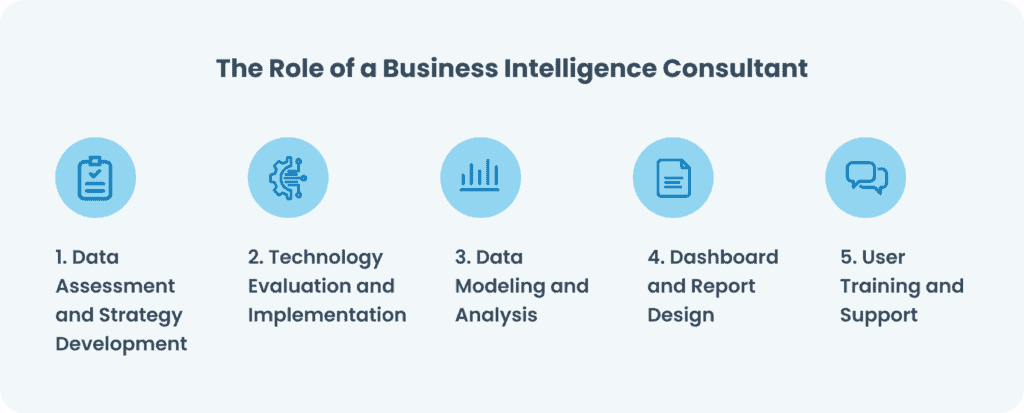
A business intelligence consultant acts as a guide through the intricate process of leveraging data for strategic advantage. Their role encompasses several key responsibilities:
Data Assessment and Strategy Development: Consultants evaluate the existing data landscape within an organization, identifying strengths, weaknesses, opportunities, and threats. They then collaborate with stakeholders to develop a robust BI strategy aligned with the organizational goals.
Technology Evaluation and Implementation: Selecting the right technology stack is crucial for effective BI. Consultants evaluate existing systems, recommend suitable technologies, and oversee the implementation of BI tools that align with the organization’s needs.
Data Modeling and Analysis: Business intelligence consultants conduct in-depth data analysis, employing various modeling techniques to extract meaningful insights. They explore correlations, trends, and patterns within the data, providing a foundation for informed decision-making.
Dashboard and Report Design: Visualization is a key component of BI. Consultants design intuitive dashboards and reports that convey complex data in a comprehensible manner. These visualizations empower decision-makers to grasp insights quickly.
User Training and Support: To ensure successful BI adoption, consultants provide training sessions to users across different levels of the organization. Ongoing support is also crucial, helping users navigate the BI tools and address any challenges that may arise.
Why Is Business Intelligence Consulting Essential?
Strategic Decision-Making: At the core of Business Intelligence Consulting is the enhancement of strategic decision-making. By leveraging data, organizations gain a comprehensive understanding of their operations, market dynamics, and customer behavior. This, in turn, enables leaders to make well-informed decisions that drive the organization forward.
Improved Operational Efficiency: Efficiency is a key driver of success in today’s competitive business environment. Business intelligence consultants identify inefficiencies within processes, streamline operations, and optimize resource allocation. This results in cost savings and improved overall operational efficiency.
Competitive Advantage: In a landscape where data is a valuable asset, gaining a competitive advantage requires not just collecting data but interpreting it effectively. Business intelligence consulting allows organizations to stay ahead of the curve by identifying market trends, understanding consumer preferences, and adapting strategies accordingly.
Enhanced Customer Experience: Understanding customer behavior is pivotal for success. BI consultants analyze customer data to identify trends, preferences, and pain points. This information is then utilized to tailor products and services, leading to an enhanced customer experience and increased satisfaction.
Agility in Response to Market Changes: Market conditions are dynamic, and the ability to adapt swiftly is a competitive advantage. Business intelligence consulting equips organizations with real-time insights, enabling them to respond promptly to market changes, emerging trends, and unforeseen challenges.
Key Considerations in Business Intelligence Consulting
Alignment with Business Goals: For BI efforts to be successful, they must align closely with the organization’s overarching goals and objectives. Consultants need a deep understanding of the business’s mission, vision, and strategic priorities.
Data Quality and Integration: Data is the foundation of BI, and its quality is paramount. Consultants must address data quality issues and ensure seamless integration across various sources. Inconsistent or inaccurate data can lead to flawed insights.
Scalability: As organizations grow, their BI needs evolve. Consultants must design scalable solutions, accommodating increased data volumes and user demands. This scalability ensures that BI initiatives remain effective in the long term.
User Adoption: A BI solution is only as good as its adoption by end-users. Consultants must prioritize user-friendliness, providing intuitive interfaces and comprehensive training programs to ensure widespread acceptance and utilization.
Security and Compliance: With the increasing emphasis on data privacy and security, BI consultants must implement robust measures to protect sensitive information. Compliance with data protection regulations is non-negotiable.
Return on Investment (ROI): BI initiatives represent a significant investment. Consultants must demonstrate the value of these investments by quantifying the return on investment. This involves tracking key performance indicators and assessing the impact of BI on business outcomes.
The Future of Business Intelligence Consulting: As technology continues to advance, the future of Business Intelligence Consulting holds exciting possibilities:
Artificial Intelligence Integration: Integrating artificial intelligence (AI) and machine learning into BI tools will enhance predictive analytics and automate decision-making processes.
Cloud-Based Solutions: Cloud-based BI solutions are gaining prominence, offering scalability, flexibility, and accessibility. Consultants will likely focus on implementing and optimizing cloud-based BI architectures.
How Can You Implement Business Intelligence Reporting in Your Organization?
Data sources are diverse: databases, spreadsheets, APIs, external feeds. The goal is simple. Give your organization data that’s accurate and current so decisions can be made confidently.
Implementing BI reporting isn’t just about dashboards. It drives better decisions and more efficient operations. Your competitive edge comes from treating BI as a structured process: strong data management, solid data modeling, and clear visualization. Without that foundation, dashboards mean nothing.
For SMBs, the strategy is straightforward. Build clean, actionable data visualizations. Use BI tools like Power BI to surface what matters. Do this well, and your organization makes better decisions faster than competitors. That’s the advantage.
Microsoft Power Platform: Empowering Business Intelligence
Microsoft Power Platform comprises Power Apps, Power Pages, Power Automate, and Microsoft Copilot Studio, along with Microsoft Dataverse and governance capabilities. The platform connects data, applications, and automation so insights translate directly into action.
Teams can build custom solutions using a drag-and-drop interface, pulling data from Microsoft’s Common Data Service or external sources like QuickBooks and Google Analytics. The result is faster decision-making backed by real data. Whether tracking day-to-day operations or identifying market patterns, critical information reaches the people who need it.
Small and medium businesses benefit most—no intricate coding required, yet the impact is substantial. Organizations start by addressing specific needs and scale up as requirements evolve.
Power BI: Unleashing Insights with Data Transformation
Microsoft Power BI is a business analytics tool built for visualizing and sharing insights from your data. It includes powerful features for data analysis, interactive reporting, and customizable dashboards. Users become decision-makers grounded in real-time information rather than guessing.
Power BI now defaults to the PBIR report format, which improves performance, version control, and collaboration. Copilot capabilities let users write and refine DAX queries, analyze data using natural language, and attach reports directly to conversations. The platform supports Delta Lake and Parquet formats to reduce data duplication and avoid vendor lock-in. Direct Lake mode in OneLake delivers faster performance without heavy data refreshes.
Modern visual defaults bring a fresh design to reports. Input slicers let users type or paste filter values directly instead of scrolling through lists. Custom totals ensure calculations like averages and counts display correctly rather than simple sums.
Power Apps: Empowering Custom Solutions
Power Apps lets you build custom business applications without coding. Teams automate processes, capture data, and create workflows that fit their actual needs.
Microsoft 365 Copilot chat is now embedded directly inside model-driven apps. Users ask questions, reason over in-app data, and connect insights from documents without leaving the application. Power Apps MCP Server (in preview) lets agents parse unstructured data like invoices or email threads and create records directly in Dataverse, flagging them for human review when needed.
Whether developing apps for data entry, reporting, onboarding, approvals, or more, Power Apps provides a user-friendly canvas for bringing ideas to life. Drag-and-drop connectors integrate with other Microsoft platforms, allowing data to flow across tools like SharePoint, Excel, and Dynamics 365. Modern controls and theme reuse reduce repetitive styling work.
Use cases show the range. One organization digitized COVID health screening for the workplace. Employees submitted questionnaire responses from their phones before entering the building, with data stored securely in HR systems and automatic alerts flagging issues.
The same approach worked for onboarding. Teams used customizable templates to turn procedures into guided digital checklists, forms, and tasks. Data uploaded directly to repositories for reporting, cutting administrative work.
The possibilities are wide. The no-code platform lets problem-solvers optimize workflows through automation and modern interfaces. AI-assisted app generation now lets users describe an app in natural language to generate a working starting point.
Power Automate: Streamlining Workflows
Power Automate automates workflows between apps and services. By connecting platforms you already use, it coordinates tasks, ensures data stays consistent, and eliminates repetitive manual work.
With drag-and-drop configuration, anyone can build automated workflows. Copilot-based expression building lets users describe what they want using natural language. Desktop flows now include self-healing AI that retries failed UI actions using alternative elements.
Take information requests from a website portal. Before Power Automate: staff checked submissions periodically, entered data manually into spreadsheets, and emailed contacts. The process was slow and error-prone. Now: Power Automate instantly syncs request data to Excel and notifies the team through their preferred platform.
These small improvements compound across an organization. Power Automate recovers hours lost to administrative work. Teams redirect that time toward innovation while the tech stack runs on autopilot. Process mining helps organizations analyze how work is actually being done and identify inefficiencies.
Microsoft Copilot Studio: AI-Powered Agents
Microsoft Copilot Studio is a cloud-based service for building AI agents. Create standalone agents for customer and employee support, extend Microsoft 365 Copilot, or develop autonomous agents that handle complex tasks independently. Use a low-code authoring canvas to control how topics interact, how conversations flow, and what the experience feels like.
Computer use is now available in preview, letting agents operate apps and websites directly—clicking, typing, and navigating interfaces without requiring API connections. File upload and analysis capabilities let agents process Excel, CSV, and PDF files. Model Context Protocol (MCP) support lets agents integrate with external tools and data sources.
Power Pages: Extending Business Solutions
Power Pages lets you create external-facing websites for customers, partners, or employees. Secure access to data, forms, and applications is built in.
The Agent API for Power Pages (new in 2026) enables site creators to build custom chat experiences and integrate them seamlessly with custom Copilot Studio agents. A GitHub Copilot CLI plugin is now available for Power Pages, letting developers understand table permissions, web roles, site settings, and authentication configuration directly in their code.
Security features include role management that merges web roles with Dataverse security roles, automated vulnerability scanning, and admin monitoring tools that alert administrators of security threats and policy violations.
Integrating the Power Platform for Holistic BI Solutions
The Power Platform creates a unified ecosystem for analytics and action. Power BI surfaces insights. Power Apps and Copilot Studio build the agents and interfaces to act on those insights. Power Automate connects systems and coordinates workflows. Power Pages provides external-facing access when needed.
When these tools integrate, data flows from source to decision to action without manual handoffs. Organizations eliminate silos and move faster—from identifying problems to solving them. The integrated suite becomes the backbone for strategic initiatives, enabling teams to respond to market changes and scale their operations.

To learn more about how GadellNet can power your company with business intelligence reporting and the Microsoft Power Platform, reach out today.
